Create a workspace
Give agents and humans the same markdown-backed planning home.
plansman init --workspace app
A centralized plan system for humans and agents. Markdown files become a navigable DAG, follow-ups become forks, and conflicting threads resolve in one place before they drift.
Plansman is built around real planning behavior: start with a plan, execute it, fork the next necessary follow-up, and keep the whole lineage visible instead of losing it in a chat thread.
Give agents and humans the same markdown-backed planning home.
plansman init --workspace app
Folder structure acts as categories; markdown remains easy to diff and review.
plans/
platform/
plan-12.md
launch/
plan-13.md
When execution reveals another task, mark it as a follow-up instead of changing the main path.
follow_up: plan-12
Plansman makes the cost of a detour visible. You can inspect where a card sits in the tree, keep a DAG pane open beside the work, and see whether a new idea is on the main path or a fork that should wait.
The markdown corpus is the center. The web UI helps you navigate it, the CLI keeps it fast, REST connects product surfaces, and MCP gives agents a structured way to read and write plans.
Initialize, list, inspect DAGs, and open resolutions without leaving the repo.
Back app screens and automation with the same workspace operations.
Agents can discover, update, and resolve plans through structured tools.
Plans, board, DAG, drafts, and resolutions stay synced in one app shell.
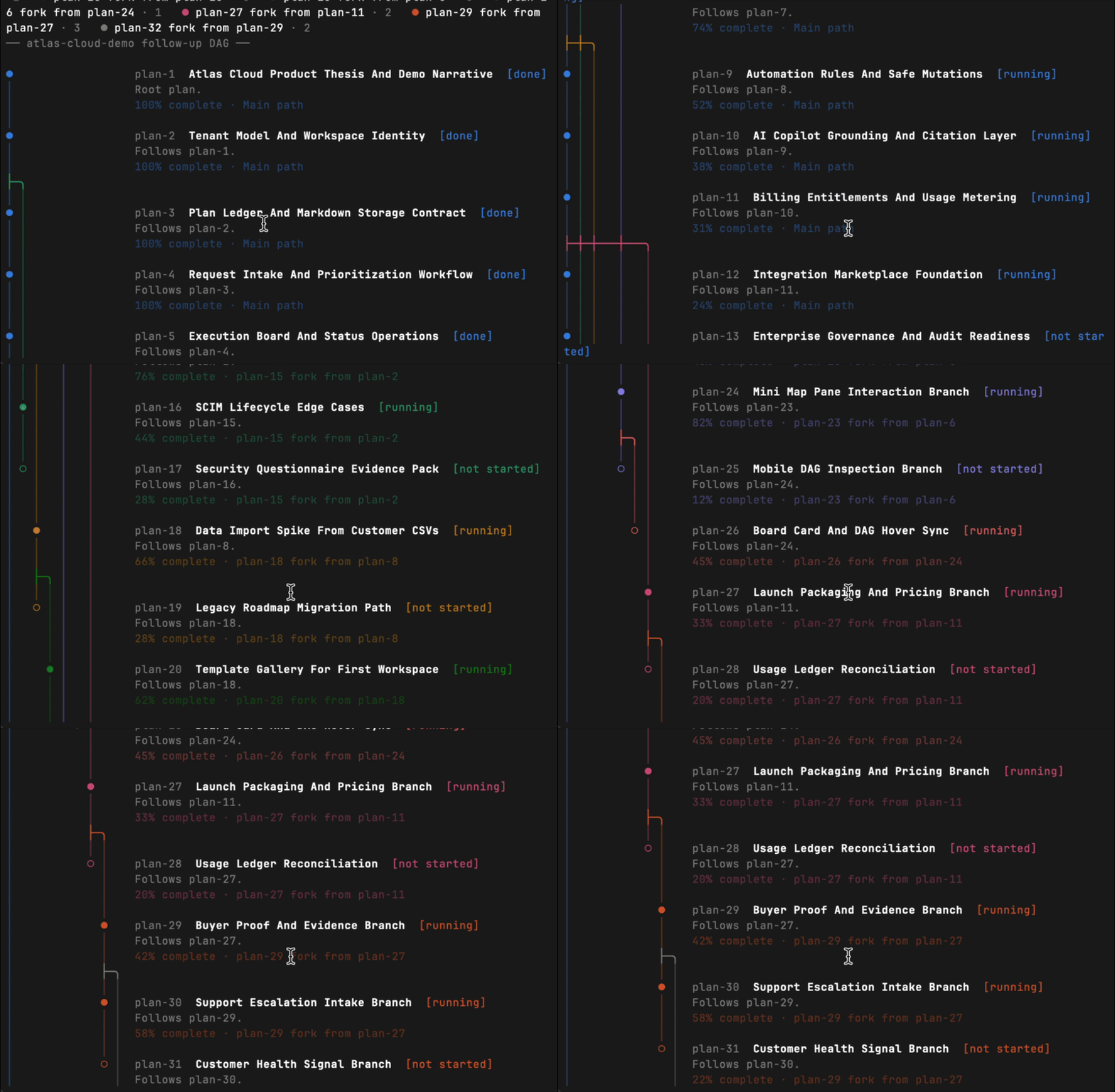
plansman dag renders the same follow-up lineage as the web view: branch
filters, colored paths, status, completion, and parent relationships, all without
leaving the shell.
plansman dag --workspace atlas-cloud-demo
The interface keeps the graph beside the work, so the current plan, its parent, and its follow-up branches are not abstract metadata. They are visible while you decide what to do next.
Select a plan and keep its graph position visible while scanning the backlog.
Move through running, waiting, and done plans without losing branch context.
Filter a branch, inspect forks, and see where follow-ups came from.
This is the real Plansman web app running against bundled Atlas Cloud demo data. Inspect plans, board columns, DAG forks, resolutions, and section notes without connecting a local workspace.
If the frame feels cramped, open the demo in a new tab.
Multiple agents can work on different plans and still share one conflict path. Plansman gives the disagreement a file, collects positions, records a decision, then updates the affected plans so the corpus stops contradicting itself.
Capture which plans disagree, who is involved, and what needs a decision.
plansman resolutions open \
--title "Lifecycle naming" \
--plans plan-9,plan-26 \
--party agent-a
The resolution becomes the place where a decision is accepted and reflected into the plans.
plansman resolutions decide 42 \
--status agreed \
--decision "Use soft-delete and restore"
Install Plansman CLI to keep planning practical: markdown in folders, visible DAG lineage, and a resolution center for the decisions that would otherwise scatter across threads.
curl -fsSL https://plansman.xyz/install.sh | sh
plansman init --workspace app